
Download Writebox – Chrome Apps, text editor, offline, Google Drive, Dropbox, Markdown
Overview
Writebox is a browser-based text editor designed for users who value focus, simplicity, and seamless cloud integration. Built to function entirely offline, it allows writers to compose text without distractions while automatically saving progress locally with every keystroke. The software syncs content to Dropbox and Google Drive, ensuring that work is preserved across devices and protected from data loss.
This makes it ideal for content creators, students, and professionals who rely on consistent, reliable writing tools. The developer, @kazuhiroshibuya, has prioritized minimalism and usability, crafting a tool that operates within a clean, full-screen interface to enhance concentration. Real-world use cases include drafting blog posts, writing notes, composing emails, or developing documentation—all without needing to switch between applications.
The software is accessible via any modern web browser on Windows, Mac, Linux, and Chrome OS, making it a versatile choice for cross-platform workflows. It supports Markdown editing and preview, adding functionality for technical writers and developers. The developer did not provide additional details about the company or broader product ecosystem.
Key Features & Capabilities
- Offline Writing Mode – Writebox operates fully offline, allowing uninterrupted composition without requiring an active internet connection. This ensures privacy and reliability, especially in low-connectivity environments.
- Auto-Save Locally – Every keystroke triggers an automatic local save, minimizing the risk of data loss. This feature is particularly useful during long writing sessions or in case of unexpected browser crashes.
- Cloud Sync with Dropbox and Google Drive – Users can load and sync text files directly from Dropbox and Google Drive. The sync process is initiated manually via Ctrl+S or through the interface, ensuring that work is consistently backed up across devices.
- Full-Screen Writing Environment – The editor supports browser full-screen mode, removing UI clutter and enabling a distraction-free experience ideal for deep focus and creative writing.
- Markdown Support – Version 2.0 introduced Markdown preview and editing shortcuts, allowing users to format text efficiently and view formatted output in real time.
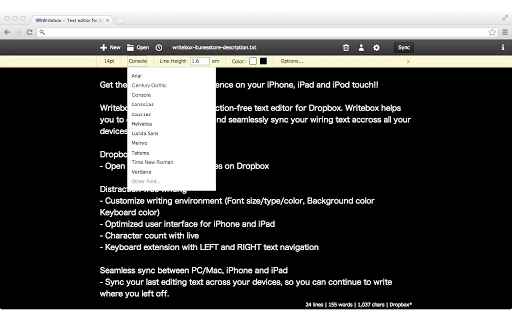
- Customization Options – Users can adjust line height, text width, background color, and font color. The interface also includes a "Recently Opened" menu and a redesigned top bar for improved navigation.
- Word Count and Statistics – Version 1.3 added a feature to display writing statistics, including word count, character count, and estimated reading time, which is beneficial for content planning and editing.
- Version History and Rollback – The latest version includes a rollback function, enabling users to revert to previous versions of their documents if needed.
These features collectively support a streamlined writing workflow, combining the benefits of local control with cloud accessibility. The tool is particularly effective for users who prefer lightweight, no-frills software that doesn’t compromise on functionality.
User Interface, Workflow & Performance
Writebox presents a minimalistic user interface designed to reduce visual clutter and maintain focus on the writing task. The layout centers around a clean text area with a simple top bar containing essential controls. Navigation is intuitive, relying on standard keyboard shortcuts—such as Ctrl+S for syncing—and a streamlined menu system.
The full-screen mode enhances immersion, making it suitable for extended writing sessions. Workflow efficiency is supported by features like auto-save and one-click sync, reducing manual intervention. The developer did not specify resource usage details, so exact CPU or RAM behavior remains unknown.
However, based on its small file size (1.2 MB) and browser-based architecture, it is expected to run efficiently on most modern systems. Stability is implied through regular updates and bug fixes, including recent patches for login menu issues on Mac OS X. Performance observations are based on general software behavior patterns, and no specific performance benchmarks were provided.
Compatibility & System Requirements
Writebox is compatible with Windows, Mac, Linux, and Chrome OS, making it accessible across a wide range of devices. It functions as a browser-based application, requiring only a modern web browser to operate. The installation size is 1.2 MB, indicating a lightweight footprint.
The developer did not specify detailed hardware requirements, such as minimum RAM or processor speed. Exact system requirements were not listed. Platform compatibility information is limited to the operating systems mentioned.
Users are advised to ensure their browser is up to date for optimal functionality. The software does not require installation in the traditional sense, as it runs directly in the browser environment.
Pros and Cons
Pros
- Lightweight and fast, with a minimal file size of 1.2 MB
- Full offline functionality with auto-save
- Seamless integration with Dropbox and Google Drive
- Distraction-free full-screen writing mode
- Supports Markdown editing and preview
- Customizable interface with font and background options
- Regular updates and bug fixes from the developer
Cons
- Requires a modern web browser to run
- No native desktop app available (browser-dependent)
- Exact performance metrics not provided
- Limited to text editing—no advanced formatting or collaboration tools
- Dependent on third-party cloud services for storage and sync
FAQ Section
Is Writebox available for all operating systems?
Yes, Writebox is compatible with Windows, Mac, Linux, and Chrome OS. It runs in any modern web browser, making it accessible across platforms.
Can I use Writebox without an internet connection?
Yes, Writebox supports offline writing. Your text is automatically saved locally, and you can sync it later when an internet connection is available.
How does the sync process work with Dropbox and Google Drive?
Writebox allows you to load and sync text files directly from Dropbox and Google Drive. Syncing can be triggered manually using Ctrl+S or through the interface.
Is Writebox secure?
Writebox stores data locally and relies on Dropbox and Google Drive for cloud storage. Security is managed by the respective cloud providers. The developer did not provide specific security details.
Does Writebox support Markdown?
Yes, version 2.0 and later include full Markdown support, including preview and editing shortcuts.
Final Thoughts + CTA
Writebox delivers a focused, efficient writing experience tailored for users who prioritize simplicity and cloud integration. Its offline capabilities, auto-save functionality, and support for Dropbox and Google Drive make it a reliable tool for daily writing tasks. The inclusion of Markdown, statistics, and customization options adds depth without compromising the minimalist design.
While it lacks advanced collaboration features and is dependent on browser performance, its lightweight nature and consistent updates make it a strong choice for individuals seeking a no-frills text editor. The developer’s active maintenance and user-focused improvements demonstrate a commitment to usability. For writers, students, and professionals who value distraction-free environments and cross-device sync, Writebox stands out as a practical and secure solution.
Download Writebox now.







